
automatic wallpaper changer 33.5.4 - Get APK
You'll be able to download in few seconds.
Publisher Description
Personalize your device by turning your favorite photos into wallpaper!
--- Turn your favorite photos into wallpaper! ---
Have fun personalizing your device with images of friends, family members, special memories—anything you choose! You can even use images stored on an SD card.
--- Schedule your wallpaper to change automatically! ---
With this application, you can select any saved image and have it automatically be displayed as your wallpaper for a set amount of time. You can even set the wallpaper to be changed when the screen is off, and this app won’t interfere with any other operations. You can choose to show images from newest to oldest, oldest to newest, or randomly. You can also set the app to start automatically when you turn the power on.
--- Automatic resizing! ---
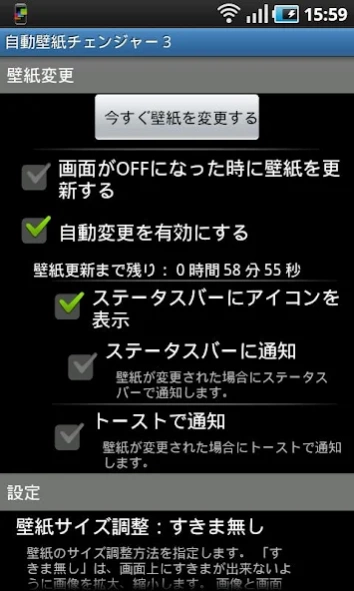
Choose one of three settings for the display of your image: no adjustments, full display, or no gaps. The no gaps feature automatically adjusts your image to fit your screen perfectly.
--- Many intervals to choose from! ---
It’s possible to change your wallpaper image in intervals from every five minutes to once a day.
--- Unlimited wallpaper images! ---
There is no limit to the number of images you can register to AWC3. As long as you have space, you can register an image to AWC3.
--- Saves memory! ---
This app does not create unnecessary copies of your images to use as wallpaper. Instead, in order to save memory, it only registers the file information of images selected for use as wallpaper.
--- Saves energy! ---
When your screen is off, changes to your wallpaper are limited to once in order to save energy. Until you turn your screen on again, the wallpaper won’t be changed. (This feature went live with version 3.3. Not only is this feature intended to save battery life, but it also corrected a bug when trying to operate the device after the screen comes out of sleep mode.)
--- Improved response! ---
In order to avoid interfering with the normal operation of your device, special consideration was taken to separate the wallpaper changing program and the program that controls your device’s display. (If you notice a one-second delay in your device’s responsiveness, this is a problem with your device’s Android system or the device itself.)
--- Choose your notifications! ---
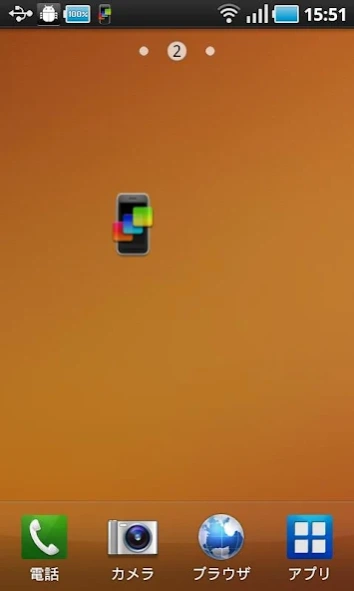
An icon can be set to display on your device’s status bar whenever the application is activated. Each time the wallpaper changes, the icon will animate. You can also have notifications displayed via toast window (short message). Both of these notifications can be turned off. The AWC3 widget on your home screen, which allows you to change the wallpaper at a tap without starting up the app, also animates whenever changes to the wallpaper are made, and the color changes when the on/off status of the app changes.
--- Notices ---
This application will connect to the internet to display advertisements.
This application has been tested on Xperia, Galaxy-S, and Galaxy Tab devices.
About automatic wallpaper changer 3
The company that develops automatic wallpaper changer 3 is ohanasiya Corp.. The latest version released by its developer is 3.5.4.
To install automatic wallpaper changer 3 on your Android device, just click the green Continue To App button above to start the installation process. The app is listed on our website since 2013-02-03 and was downloaded 0 times. We have already checked if the download link is safe, however for your own protection we recommend that you scan the downloaded app with your antivirus. Your antivirus may detect the automatic wallpaper changer 3 as malware as malware if the download link to net.ohanasiya.android.flickwallnet is broken.
How to install automatic wallpaper changer 3 on your Android device:
- Click on the Continue To App button on our website. This will redirect you to Google Play.
- Once the automatic wallpaper changer 3 is shown in the Google Play listing of your Android device, you can start its download and installation. Tap on the Install button located below the search bar and to the right of the app icon.
- A pop-up window with the permissions required by automatic wallpaper changer 3 will be shown. Click on Accept to continue the process.
- automatic wallpaper changer 3 will be downloaded onto your device, displaying a progress. Once the download completes, the installation will start and you'll get a notification after the installation is finished.
Program Details
System requirements
Download information
Pricing
Version History
version 3.5.4
posted on 2013-02-04
In this latest version, the following changes have been made.
-Added the ability to adjust wallpaper size.
-Fixed bugs related to adjusting wallpaper size.
-Adjusted wallpaper settings.
-Fixed bugs in the initial parameters.
-Added 1-minute and 3-minute interval options.
-Changed the way JPG data was handled.
Disclaimer
External Download
We do not host automatic wallpaper changer 3 on our servers. We did not scan it for viruses, adware, spyware or other type of malware. This app is hosted by Galad and passed their terms and conditions to be listed there. We recommend caution when installing it.
The APK Download link for automatic wallpaper changer 3 is provided to you by apps112.com without any warranties, representations or guarantees of any kind, so access it at your own risk.
If you have questions regarding this particular app contact the publisher directly. For questions about the functionalities of apps112.com contact us.
